AWS Notes: SQS + SNS + Kinesis + Active MQ
Messaging Services
AWS has several messaging services for different use cases:
- SQS (Simple Queue Service): Message queue - decouple applications, async processing
- SNS (Simple Notification Service): Pub/sub messaging - send notifications to multiple subscribers
- Kinesis: Real-time streaming data - process large streams of data in real-time
- Active MQ: Managed message broker - traditional messaging protocols (JMS, AMQP, etc.)
Each solves different problems - queues for decoupling, notifications for pub/sub, streaming for real-time data, and message brokers for enterprise messaging.
Amazon SQS
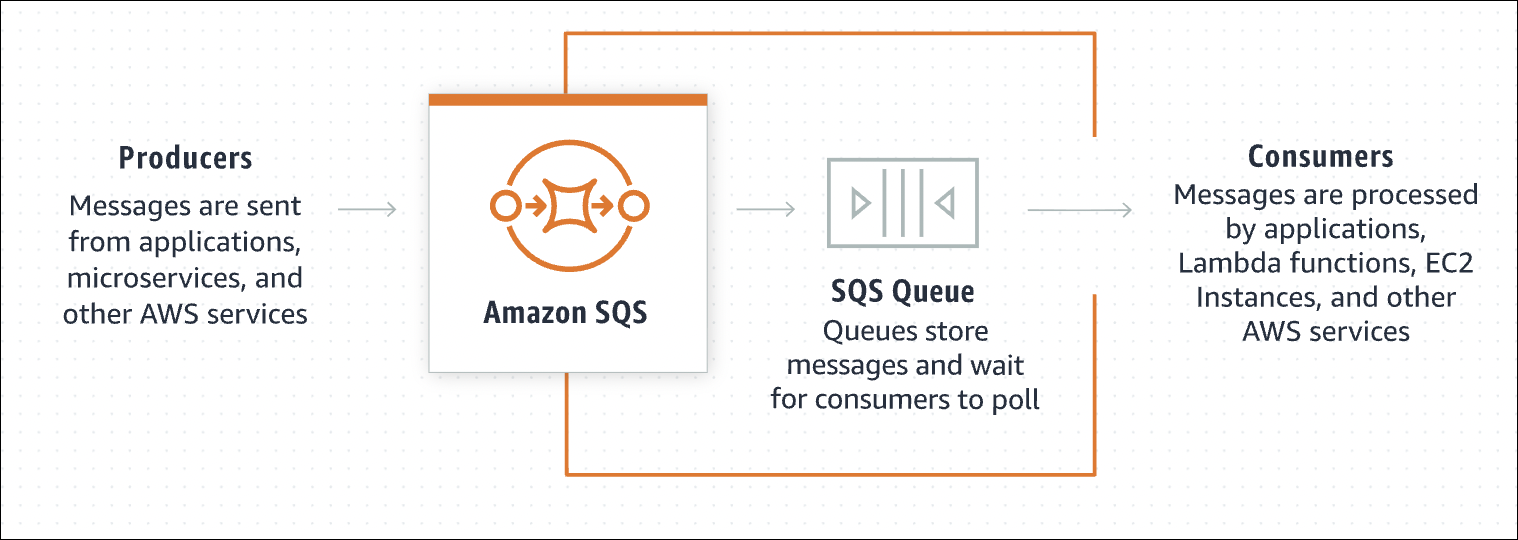
SQS is a message queue service. Think of it like a waiting line - messages wait in line, and workers process them one by one.
You have a web app that processes images. User uploads image → web app needs to resize it. Without SQS: web app waits for resize to finish → user waits → slow. With SQS: web app puts resize job in queue → returns immediately → worker picks up job → processes it → done. User doesn’t wait, web app doesn’t wait.
How It Works
- Producer (your app) sends messages to queue using
SendMessageAPI. Messages wait in queue. - Consumer (worker) pulls messages using
ReceiveMessageAPI, processes them, then must delete them usingDeleteMessageAPI. If consumer doesn’t delete message, it becomes visible again after visibility timeout (goes back to queue). If consumer fails before deleting, message goes back to queue (someone else can process it).
Why Use It
- Decoupling: Web app doesn’t need to know about workers. Web app sends message, forgets about it.
- Scalability: Need more workers? Add more. Queue handles the load.
- Reliability: If worker crashes, message stays in queue. Another worker picks it up.
- Async processing: Don’t make users wait for slow operations.
Queue Types
Think of Standard Queue like a bank with multiple tellers. People line up, but tellers call whoever is ready. Person 1, 2, 3 arrive → teller 1 takes person 2, teller 2 takes person 3, teller 1 finishes and takes person 1. Order doesn’t matter, as long as everyone gets served. Sometimes same person might get called twice (rare, but can happen).
Standard Queue:
- Like bank with multiple tellers - fast, but order doesn’t matter
- Messages might arrive out of order (message 2 might process before message 1)
- Might get duplicate messages (same message twice - rare but possible)
- Super fast - unlimited throughput
- Use when: order doesn’t matter, duplicates are okay
Email sending. Send 100 emails. Order doesn’t matter. If email 50 sends before email 1, that’s fine. If email gets sent twice (rare), user just deletes duplicate.
FIFO Queue:
- Like a single line at bank - first come, first served, strict order
- Messages always arrive in order (message 1, then 2, then 3)
- Never get duplicates (each message exactly once)
- Slower - limited to 3000 messages/second
- Use when: order matters, no duplicates allowed

Bank transactions. Deposit $100, then withdraw $50. Must happen in order. If withdraw happens first, account goes negative. FIFO ensures deposit happens first, then withdraw.
Visibility Timeout
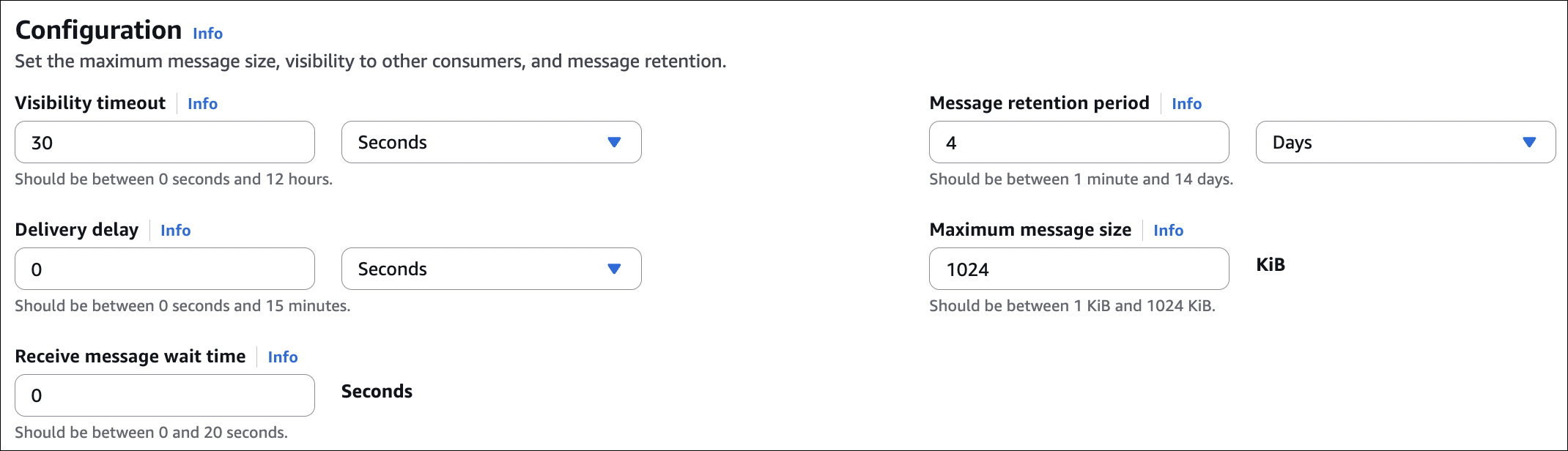
Think of visibility timeout like this: when Consumer A grabs a message from the queue, that message disappears from everyone else’s view for 30 seconds (default). Consumer A processes it, deletes it, done. If Consumer A crashes, after 30 seconds the message reappears and Consumer B can grab it.
The problem it solves:
Without visibility timeout, Consumer A and Consumer B could both grab the same message → both process it → duplicate work. Visibility timeout ensures only one consumer sees it at a time.
What happens:
Consumer A calls ReceiveMessage → gets message “resize image.jpg” → message becomes invisible to others for 30 seconds → Consumer A processes it → calls DeleteMessage → done.
If Consumer A crashes:
Consumer A gets message → starts processing → crashes after 20 seconds → doesn’t delete message → after 30 seconds total, message becomes visible again → Consumer B picks it up → processes it. Message isn’t lost, which is good.
If processing takes too long:
Consumer A gets message → starts processing → 30 seconds pass → message becomes visible again → Consumer B can also grab it → both process same message → duplicate work. Bad.
Solution:
Set visibility timeout longer than your processing time. Processing takes 2 minutes? Set timeout to 3 minutes. Or use ChangeMessageVisibility API to extend timeout while processing. Example: processing takes 60 seconds, timeout is 30 seconds → after 25 seconds, extend timeout to 60 seconds → message stays invisible → finish processing → delete.
Dead Letter Queue (DLQ)
Message keeps failing? After X retries, move it to DLQ. Don’t process it anymore, investigate later. Prevents bad messages from blocking queue.
Short Polling vs Long Polling
Short polling: Consumer asks queue “any messages?”. Queue immediately responds “no” or “here’s a message”. Consumer waits a bit, asks again. Like checking mailbox every minute - wastes time if no mail. Default behavior, but inefficient.
Long polling: Consumer asks queue “any messages?”. Queue waits up to 20 seconds. If message arrives during wait, responds immediately. If no message after 20 seconds, responds “no”. Like checking mailbox and waiting - if mail arrives, get it immediately. Saves money (fewer requests), reduces latency (get messages faster). Enable by setting
ReceiveMessageWaitTimeSecondsto 1-20 seconds.
Consumer can request up to 10 messages at once in a single
ReceiveMessagecall. Default is 1 message. Requesting more messages (up to 10) reduces API calls and costs. Process them in batch, delete them all.
⚠️ Important Things:
- Messages stay in queue until deleted (or expire, default 4 days, max 14 days)
- Message size: max 1 MiB (1024 KB).
- Standard queue: might get duplicates, order not guaranteed
- FIFO queue: no duplicates, order guaranteed, lower throughput
- Visibility timeout: message invisible while processing
- DLQ: failed messages go here
- Long polling: saves money, reduces latency
- Pay per request (first 1 million requests free per month)
SQS with Auto Scaling Group
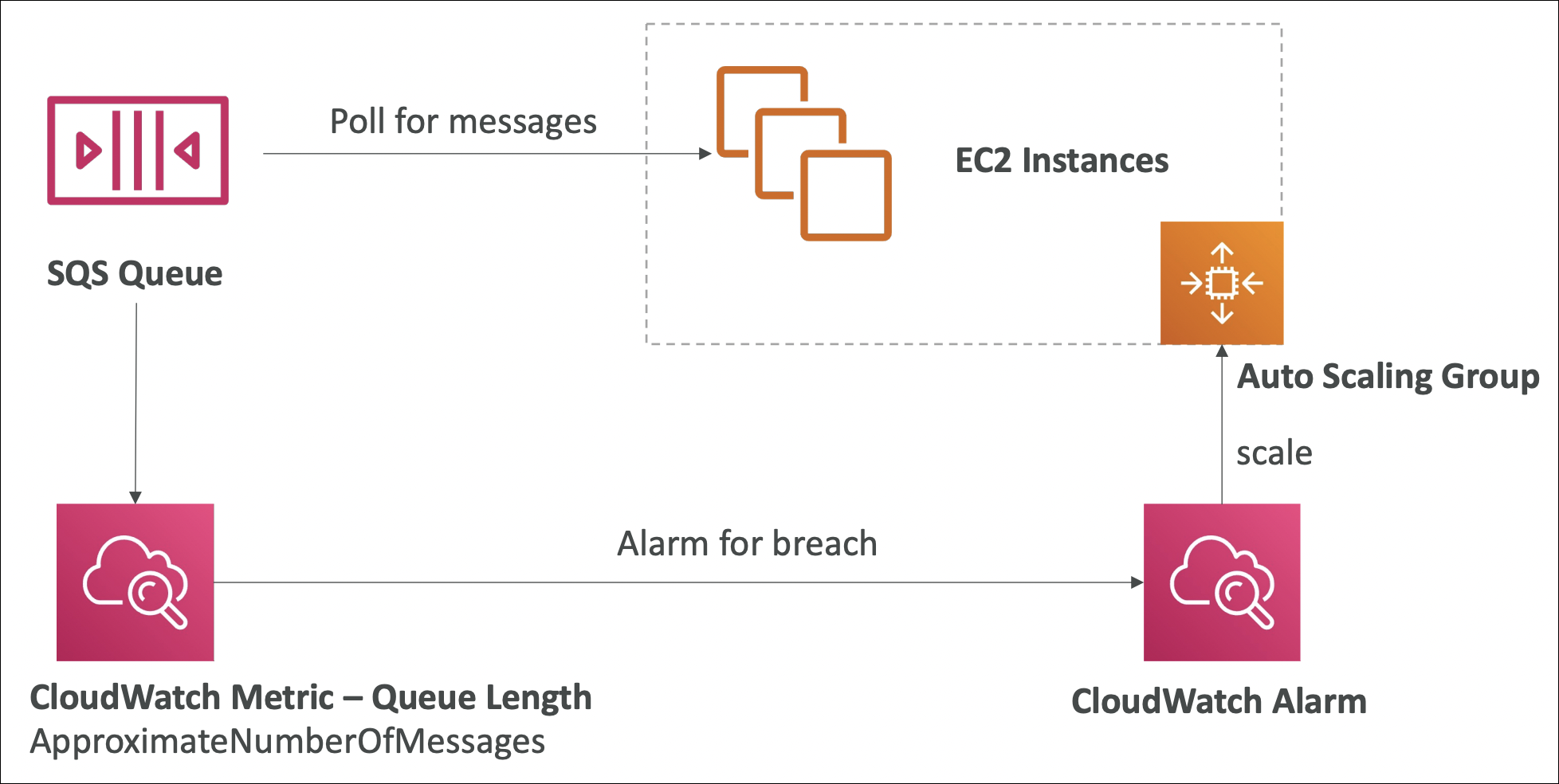
ASG can scale based on SQS queue depth. Queue has many messages? Scale out (add instances). Queue is empty? Scale in (remove instances).
How it works:
Create a target tracking scaling policy based on ApproximateNumberOfMessagesVisible metric. ASG monitors queue depth, automatically adds/removes instances to keep messages processing. Example: if queue has 1000 messages and each instance processes 100 messages, ASG scales to 10 instances.
Benefits:
- Automatic scaling based on workload
- Cost optimization (scale down when queue is empty)
- No manual intervention needed
- Works with both Standard and FIFO queues
SQS to Decouple Application Tiers
SQS decouples frontend and backend tiers. They scale independently, don’t need to know about each other.
Example scenario:
You have a web app with image upload. Frontend gets lots of requests → needs to scale. Backend processes images → slower, needs different scaling.
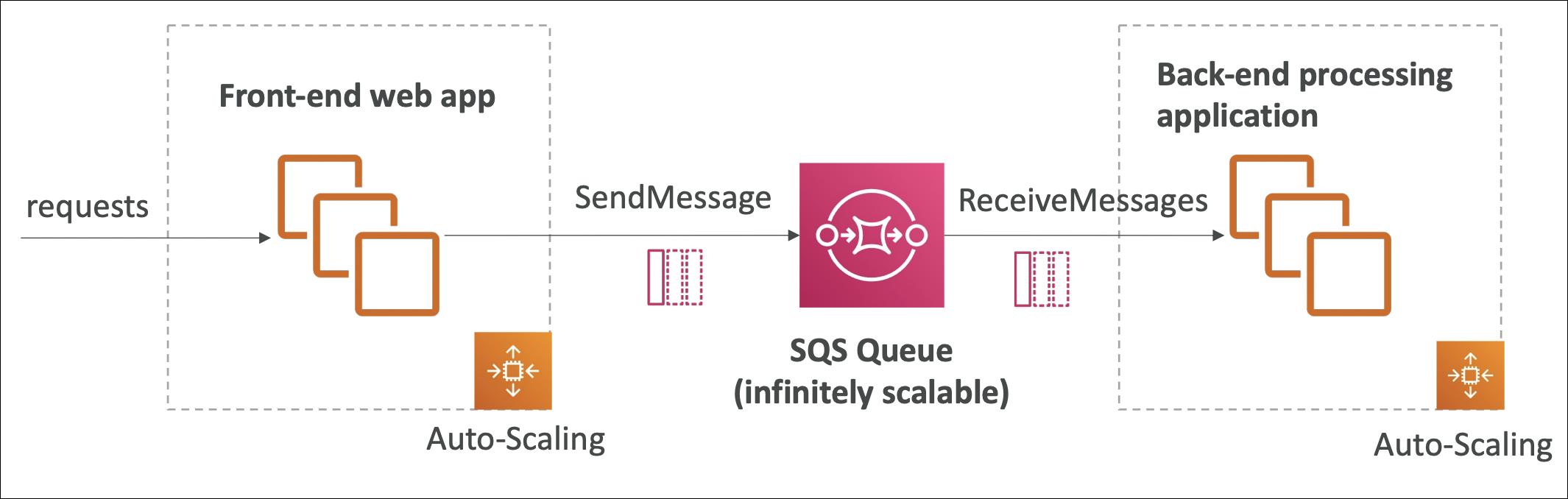
Without SQS: Frontend waits for backend to process image → slow, frontend and backend scale together → inefficient.
With SQS:
- Frontend tier (ASG 1): User uploads image → frontend puts job in SQS queue → returns immediately → user happy
- Backend tier (ASG 2): Workers pull jobs from queue → process images → done
SQS Security
Access control: IAM policies control who can send/receive/delete messages. Queue policies for cross-account access. No public access by default (unlike S3).
Encryption: All API calls use HTTPS/TLS (encrypted in transit). For encryption at rest, enable SSE-KMS (server-side encryption with KMS keys).
VPC endpoints: Use VPC endpoints for private access. Traffic stays in AWS network, no internet gateway needed. More secure.
Best practices: Use IAM roles for EC2 instances (not access keys). Enable SSE-KMS for sensitive data. Use VPC endpoints for private access. Restrict queue policies to specific IAM users/roles.
Hands-On: Send and Receive Messages
Create a queue, send a message, then receive it.
Create queue: Go to SQS Console → Create queue → Choose Standard or FIFO → Name it → Create queue.

Send message: Select your queue → Send and receive messages → Message body: type your message (e.g., {"userId": "123", "action": "resize-image"}) → Send message. Message is now in queue.
Receive message: Still in “Send and receive messages” → Click “Poll for messages” → Message appears → Read it → Delete message (or it becomes visible again after visibility timeout).
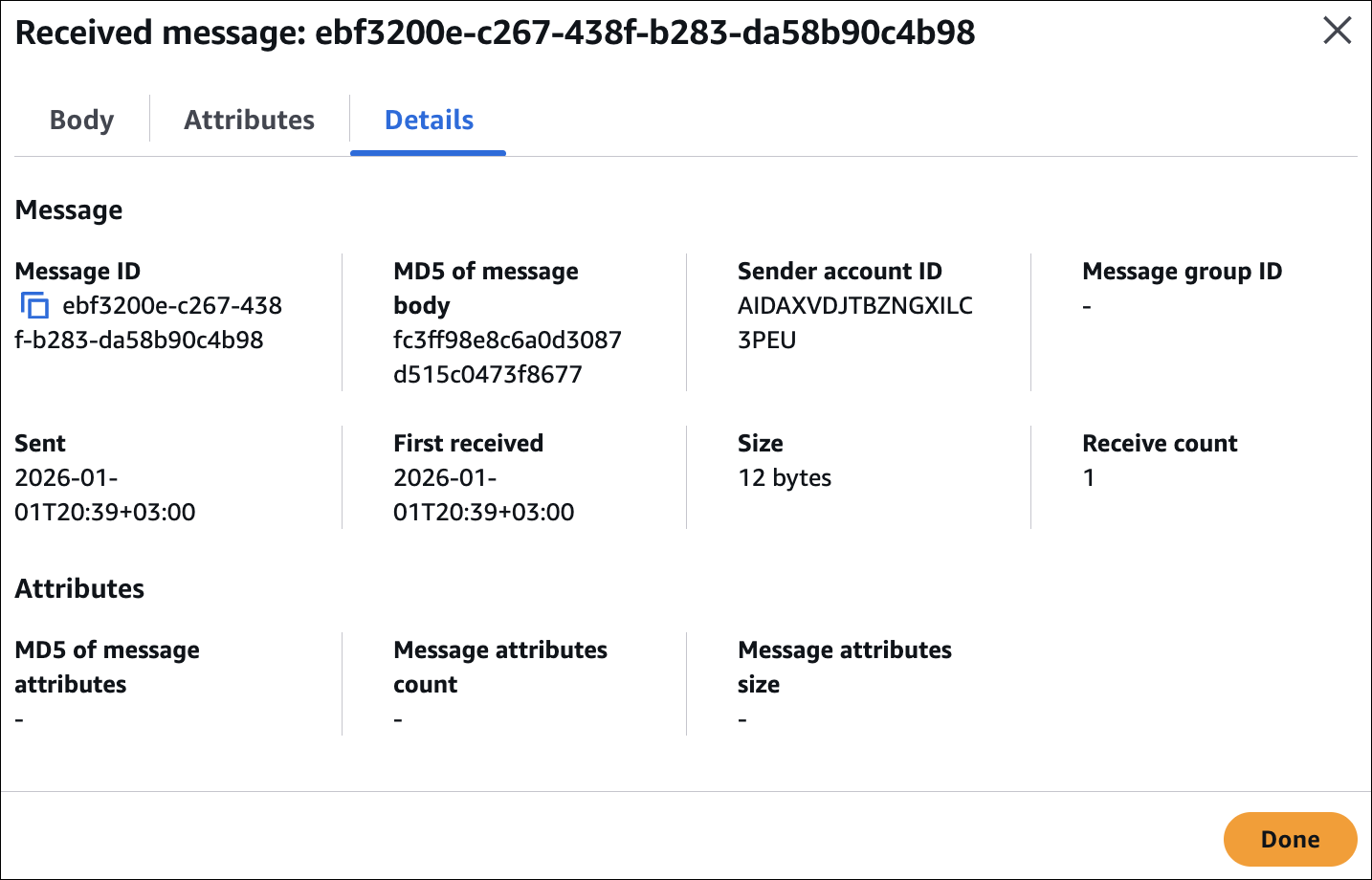
That’s it. Producer sends, consumer receives, processes, deletes. Simple.
Amazon SNS
SNS is pub/sub messaging. Think of it like a radio station - you broadcast a message, everyone tuned in gets it.
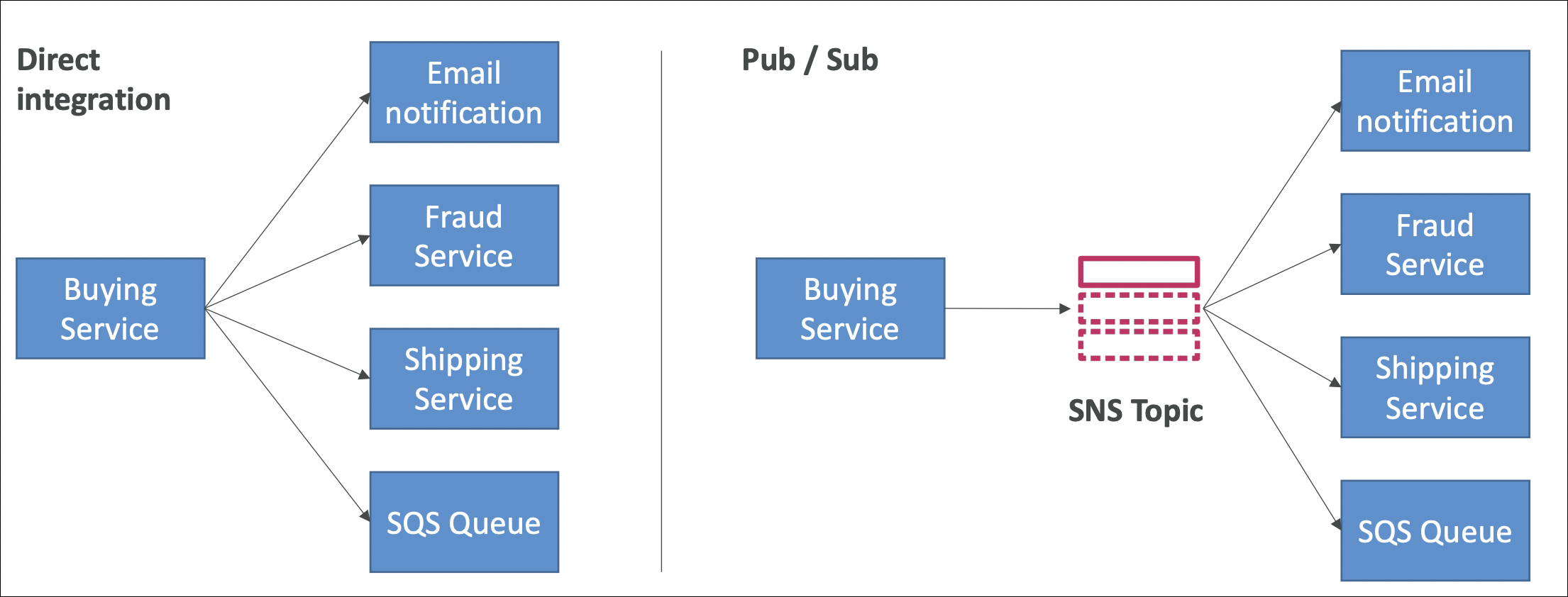
You have an event happening (order placed, user registered, payment failed). Multiple services need to know about it. Without SNS: your app calls email service → wait for response → call analytics → wait → call CRM → wait → call Lambda → wait. If email service is down? Everything breaks. Tight coupling, fragile.
With SNS: your app publishes once to SNS topic → SNS sends to everyone subscribed → email service down? Others still get notified. Loose coupling, resilient.
Why Use It
- Decoupling: Your app doesn’t need to know about all services. Publish once, forget about it.
- Scalability: Need more subscribers? Just subscribe. No code changes.
- Reliability: If one subscriber fails, others still get notified.
- Fan-out: One event → multiple services react simultaneously.
Real Example
User registers on your website. You need to send welcome email, create user profile, add to analytics, send to CRM.
Without SNS: call email service → wait → call profile service → wait → call analytics → wait → call CRM → wait. Email service down? Everything fails, user registration fails.
With SNS: publish “user registered” event to SNS topic → SNS sends to email service, profile service, analytics, CRM → email service down? Others still work, user registration succeeds. Email service comes back? Gets the message later.
How It Works
Publisher (your app) sends message to SNS topic using Publish API. Subscribers (email, SMS, Lambda function, SQS queue, HTTP endpoint, mobile push, etc.) subscribe to topic. When you publish, SNS automatically delivers to all subscribers.
Think of it like a newsletter. You write one article, publish it → everyone subscribed gets it. Some read it, some don’t, some’s email bounces - doesn’t matter, you published once.
SNS vs SQS
SNS: One-to-many. One message → multiple subscribers get it. Push model - SNS pushes to subscribers. Use when: multiple services need same event.
SQS: One-to-one. One message → one consumer gets it. Pull model - consumer pulls from queue. Use when: one worker processes message.
Example: Order placed. Use SNS → sends to email service, analytics, CRM (all get it). Use SQS → one worker processes order (only one gets it).
Use Cases
- Notifications: Order placed → send email, SMS, push notification
- Event-driven architecture: User registered → trigger Lambda, update database, send to analytics
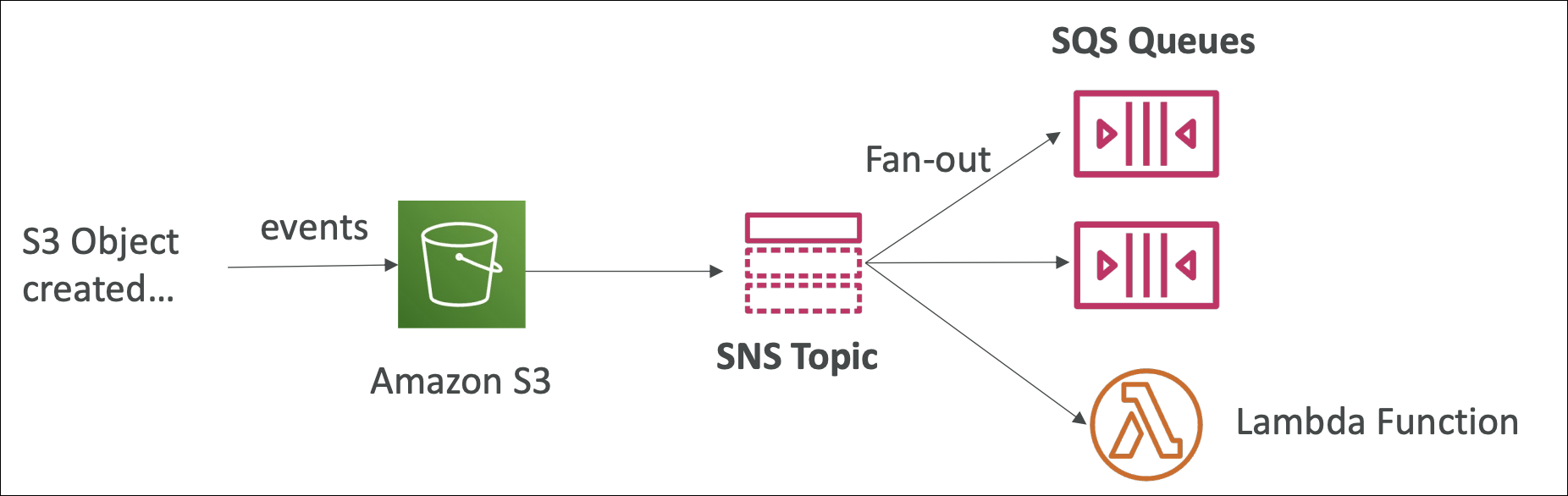
- Fan-out pattern: One event → multiple services react
- Alerts: System error → send to Slack, email, PagerDuty
SNS + SQS Fan-Out Pattern
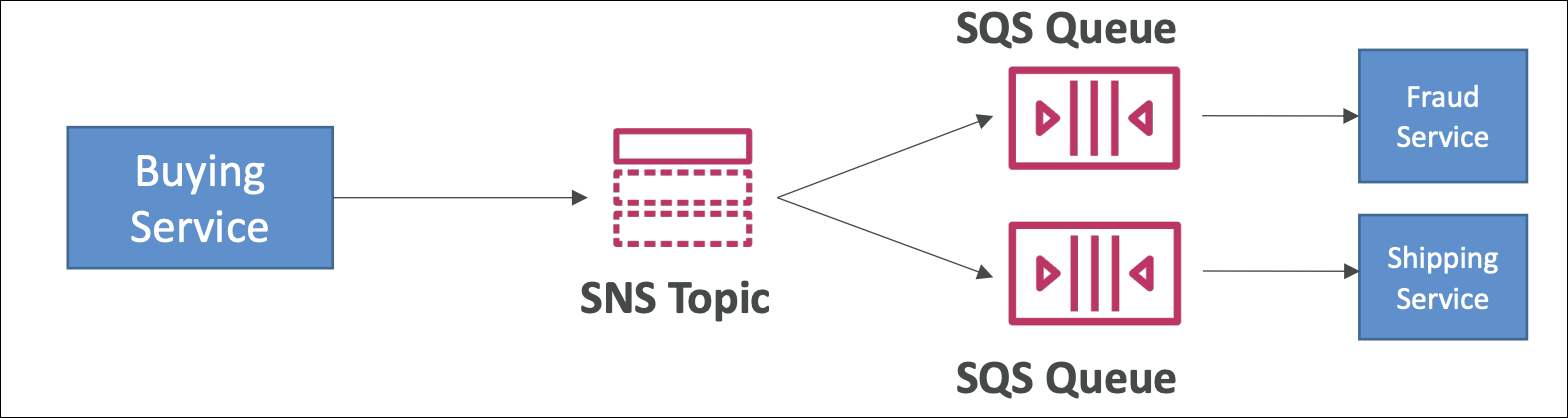
Combine SNS and SQS to get the best of both worlds: SNS’s fan-out capability + SQS’s buffering and processing power.
The problem:
You have an event (order placed). Multiple services need to process it, but they process at different speeds. Email service is fast, analytics is slow, image processing takes minutes. If you use SNS directly → fast services wait for slow ones, or slow services get overwhelmed.
The solution:
SNS topic → multiple SQS queues → workers. SNS sends message to all SQS queues simultaneously. Each queue has its own workers processing at their own pace.
How it works:
- Publisher sends message to SNS topic (e.g., “order placed”)
- SNS delivers message to all subscribed SQS queues simultaneously
- Each SQS queue buffers messages
- Workers pull from their queue at their own pace
- Fast workers finish quickly, slow workers take their time
Message Filtering
By default, SNS sends all messages to all subscribers. But what if you only want certain subscribers to get certain messages?
Example: Order placed event. You publish message with attributes: orderType: "premium", region: "US". Email service wants all orders. Premium service only wants premium orders. US analytics only wants US orders.
Without filtering: All subscribers get all messages → premium service gets non-premium orders (waste), US analytics gets all regions (waste).
With filtering: Set subscription filter policy on each subscription. Premium service subscription: {"orderType": ["premium"]} → only gets premium orders. US analytics subscription: {"region": ["US"]} → only gets US orders. Email service: no filter → gets all orders.
How it works:
- Publisher sends message with message attributes (key-value pairs) and/or message body (JSON, text, etc.)
- Each subscription can have a filter policy (JSON document)
- When creating filter policy in UI, you choose: Message attributes or Message body
- SNS evaluates filter policy against your chosen scope (attributes or body)
- If match → subscriber gets message. If no match → subscriber doesn’t get message.
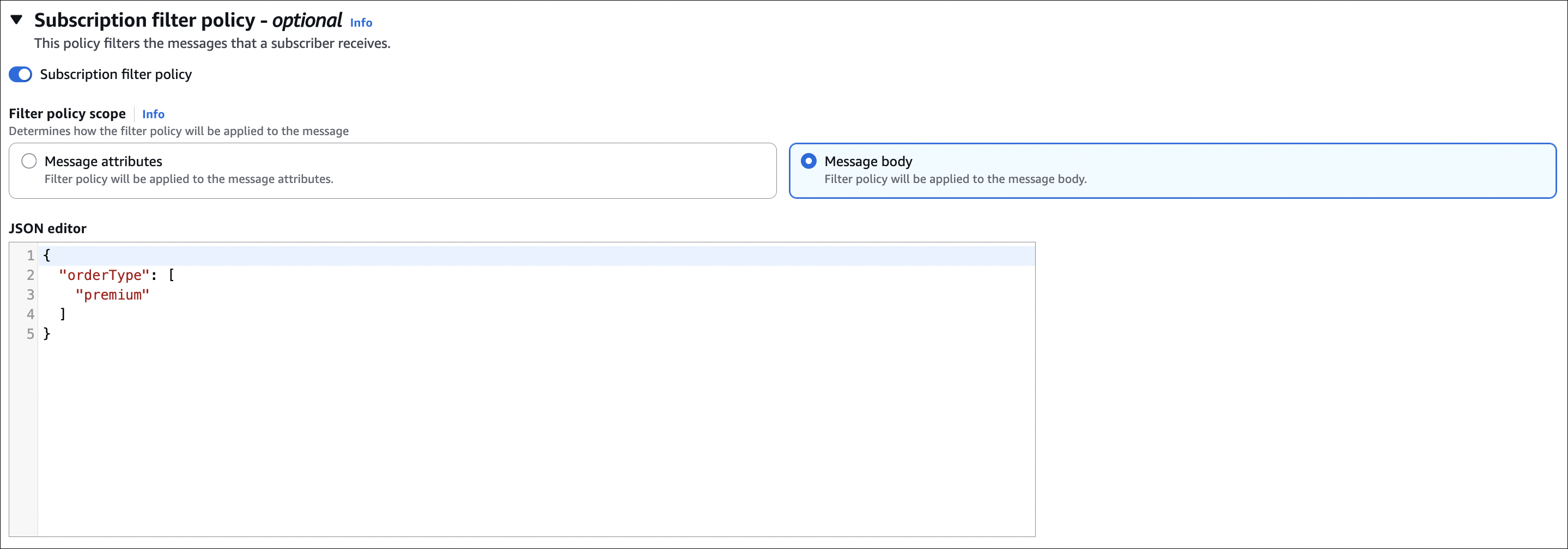
Use cases:
- Route messages based on attributes (region, type, priority)
- Reduce unnecessary processing (don’t send irrelevant messages)
- Cost optimization (fewer messages = lower cost)
Amazon Kinesis Data Streams
Kinesis Data Streams is like a pipe that holds fast-flowing data in order without losing it. Think of it like a conveyor belt - data flows continuously, and multiple consumers can read from different positions.
- Logs
- Clicks
- Metrics
- Events
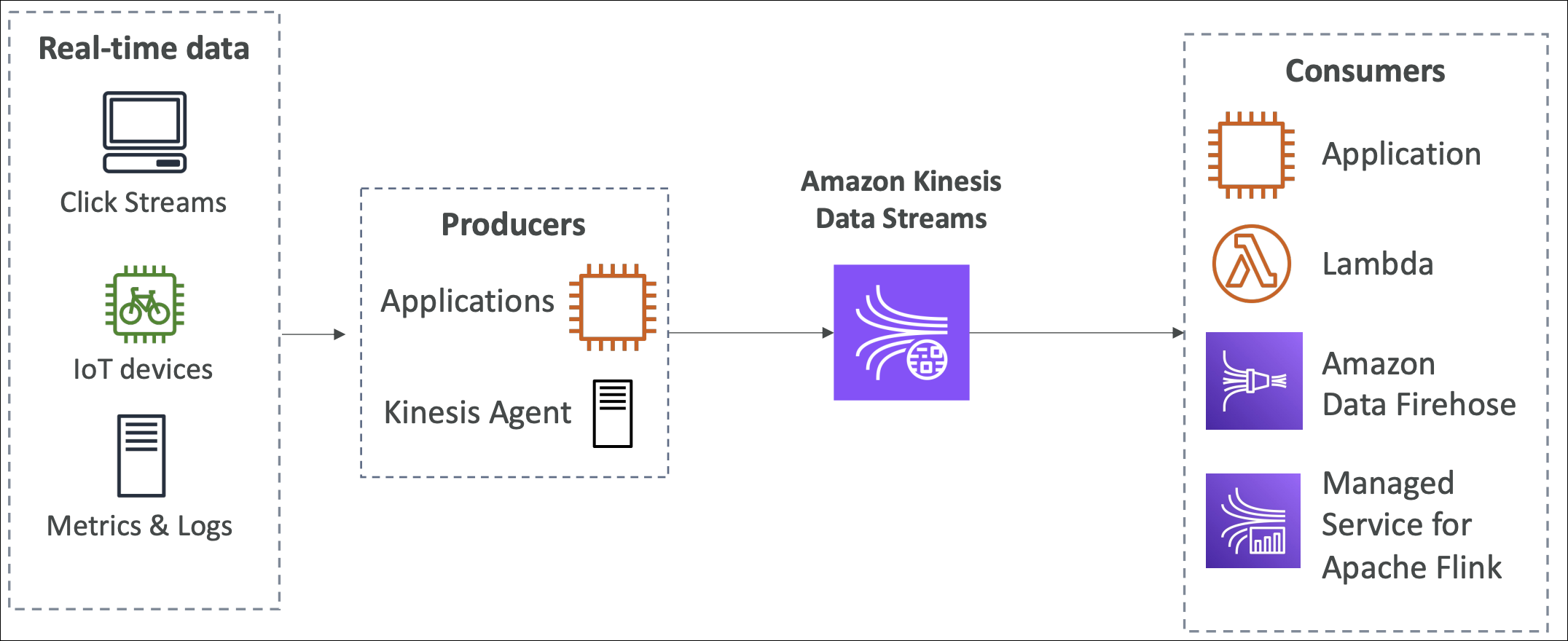
You have a lot of data coming in continuously (clickstreams, logs, IoT sensors, transactions). You need to process it in real-time. Without Kinesis: store data → batch process later → slow, outdated insights. With Kinesis: stream data → process in real-time → fast, up-to-date insights.
How It Works
Producer (your app) sends data records to stream using
PutRecordorPutRecordsAPI. Each record has: partition key (determines which shard), data (payload).Consumer (application) reads data from stream using
GetRecordsAPI. Multiple consumers can read from same stream simultaneously (each maintains their own position).
Kinesis vs SQS
Kinesis: Real-time streaming. Data flows continuously. Multiple consumers can read from different positions. Ordered processing per shard. Retention up to 365 days. Use when: real-time analytics, multiple consumers, ordered processing, replay data.
SQS: Message queue. Messages wait in queue. One consumer gets message, processes, deletes. No ordering guarantee (except FIFO). Retention max 14 days. Use when: decouple applications, async processing, one consumer per message.
Example: Clickstream data. Use Kinesis → stream continuously, multiple analytics apps read simultaneously, replay data if needed. Use SQS → queue click events, one worker processes each event, can’t replay.
Use Cases
- Real-time analytics: Clickstreams, logs, metrics → process in real-time, update dashboards
- IoT data: Sensors, devices → stream data, detect anomalies immediately
- Log aggregation: Application logs → stream to analytics, search, monitoring
- Fraud detection: Transactions → analyze in real-time, detect fraud patterns
- Data lake ingestion: Stream data → store in S3, process with EMR/Glue
- Multiple consumers: Same stream → analytics, monitoring, archiving all read simultaneously
Capacity Modes
| Feature | Provisioned Mode | On-Demand Mode |
|---|---|---|
| Shard Management | You specify number of shards upfront | AWS automatically manages shards |
| Throughput | Each shard: 1 MB/sec input, 2 MB/sec output | Auto-scales based on traffic |
| Scaling | Manually add/remove shards (resharding takes time) | Automatic scaling |
| Cost | Pay per shard hour + data ingestion | Pay per GB ingested + per GB scanned |
| Use When | Predictable, steady traffic | Unpredictable, variable traffic |
Difference: Provisioned = you manage shards, On-Demand = AWS manages shards automatically.
Important Things
- Throughput: Provisioned: each shard handles 1 MB/sec input, 2 MB/sec output. On-Demand: auto-scales.
- Partition key: Same partition key → same shard → ordered processing. Different keys → different shards → parallel processing.
- Retention: Default 24 hours, max 365 days. Data older than retention is deleted automatically.
- Multiple consumers: Each consumer maintains own position (like bookmarks). Consumer A reads from position 100, Consumer B reads from position 50 → both read independently.
- Scaling: Provisioned: add/remove shards manually (resharding takes time). On-Demand: automatic scaling.
- Cost: Provisioned: pay per shard hour + data ingestion. On-Demand: pay per GB ingested + per GB scanned.
Amazon Data Firehose
Data Firehose is like a firehose that automatically loads streaming data into destinations (S3, Redshift, Elasticsearch, etc.). You send data → Firehose buffers, transforms, compresses → delivers to destination. Fully managed, no servers to manage.
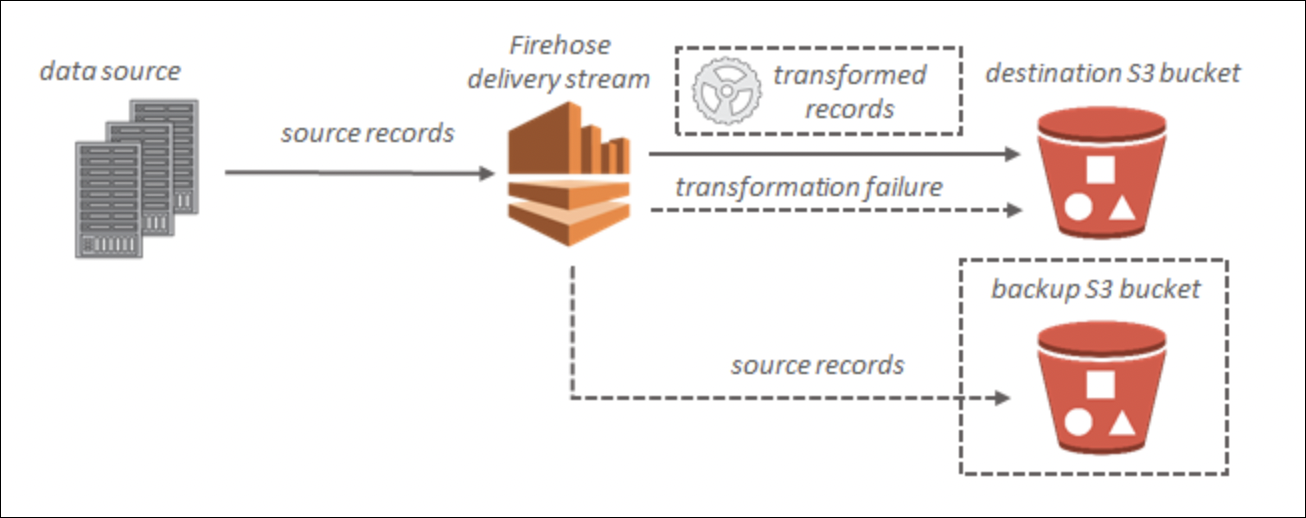
The problem it solves:
You have streaming data (logs, clickstreams, IoT data). You want to store it in S3, Redshift, or Elasticsearch. Without Firehose: write code to buffer data, batch it, compress it, transform it, deliver it → lots of code, error handling, retries. With Firehose: send data → Firehose handles everything automatically → no code needed.
Real Example
Application logs streaming in. You want to store them in S3 for analysis. Without Firehose: write Lambda to buffer logs → batch them → compress → upload to S3 → handle errors, retries → complex. With Firehose: send logs to Firehose → Firehose buffers, batches, compresses, uploads to S3 → done. No code needed.
How It Works
- Producer (your app) sends data records to Firehose using
PutRecordorPutRecordsAPI. - Firehose buffers data (collects records, batches them).
- Optional: Transform data using Lambda (e.g., convert format, filter records).
- Optional: Compress data (GZIP, ZIP, SNAPPY).
- Firehose delivers to destination (S3, Redshift, Elasticsearch, Splunk, HTTP endpoint, Datadog, New Relic, etc.).
Kinesis Data Streams vs Data Firehose
| Feature | Kinesis Data Streams | Data Firehose |
|---|---|---|
| Management | You manage consumers | Fully managed, no consumers |
| Data Processing | You read data, process it yourself | Automatically delivers to destination |
| Shards | You manage shards (Provisioned) or auto (On-Demand) | No shards to manage |
| Consumers | Multiple consumers can read simultaneously | No consumers, just destinations |
| Data Retention | Up to 365 days | No retention, delivers immediately |
| Real-time Processing | Yes, real-time streaming | Near real-time (buffering) |
| Custom Processing | Yes, write your own consumers | Limited (Lambda transformation only) |
| Destinations | None (you process data) | S3, Redshift, Elasticsearch, Splunk, HTTP, etc. |
| Use When | Real-time processing, multiple consumers, custom logic | Load data into destinations, optional Lambda transformation |
| Example | Stream data → multiple analytics apps read → custom processing | Send data → loads into S3 automatically |
Key difference: Data Streams = you manage consumers and process data. Data Firehose = fully managed, automatically delivers to destinations.
Destinations
- S3: Store data in S3 buckets (most common)
- Redshift: Load data into Redshift tables
- Elasticsearch: Index data in Elasticsearch
- Splunk: Send data to Splunk
- HTTP endpoint: Send to custom HTTP endpoint
- Datadog, New Relic: Send to monitoring services
Important Things
- Fully managed: No servers, no shards, no consumers to manage
- Buffering: Firehose buffers data before delivering (size or time based)
- Transformation: Optional Lambda function to transform data before delivery
- Compression: Optional compression (GZIP, ZIP, SNAPPY) to reduce storage costs
- Retry: Automatic retry on delivery failures
- Cost: Pay per GB ingested and delivered
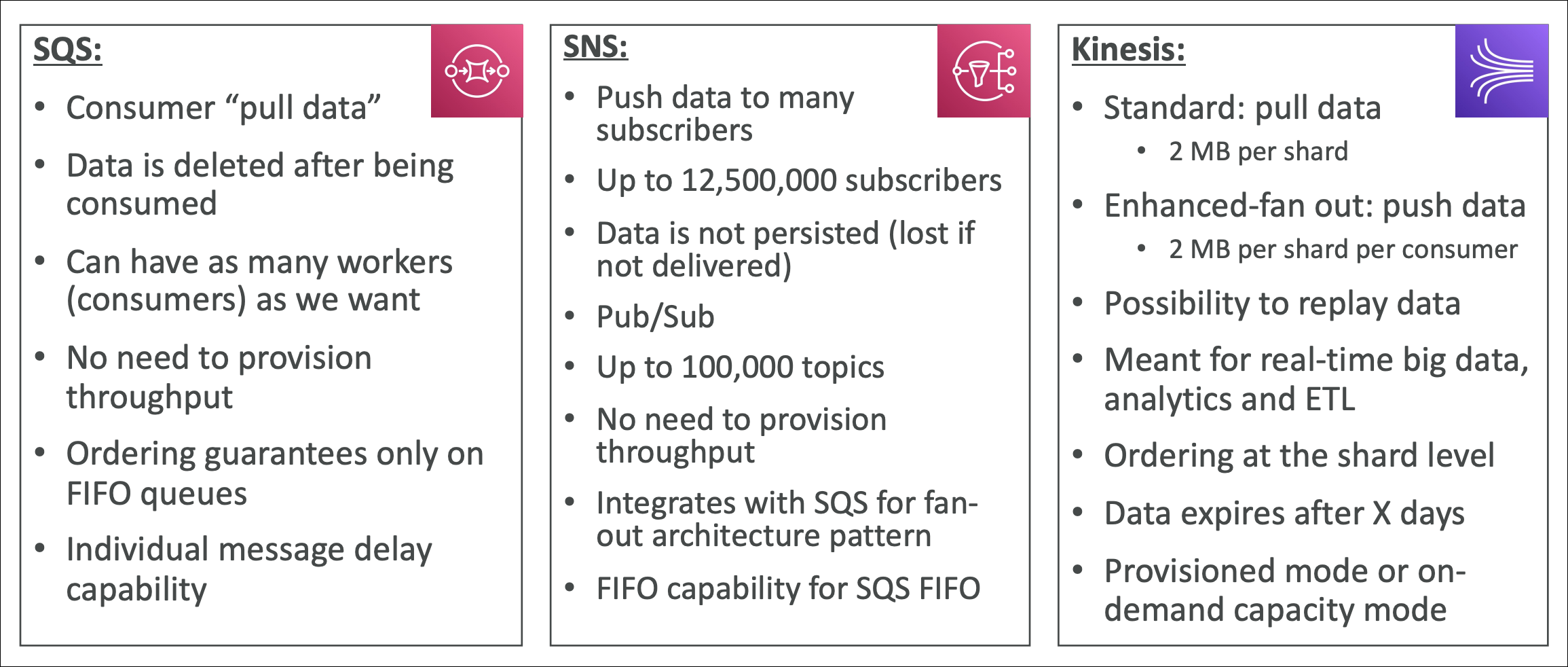
SQS vs SNS vs Kinesis
Amazon MQ
Amazon MQ is a managed message broker service. It supports traditional messaging protocols like JMS, AMQP, MQTT, STOMP, and WebSocket.
The problem it solves:
You have existing applications using traditional message brokers (ActiveMQ, RabbitMQ). You want to migrate to AWS but don’t want to rewrite code. Without Amazon MQ: rewrite applications to use SQS/SNS → lots of code changes. With Amazon MQ: lift and shift → applications work as-is, no code changes.
How It Works
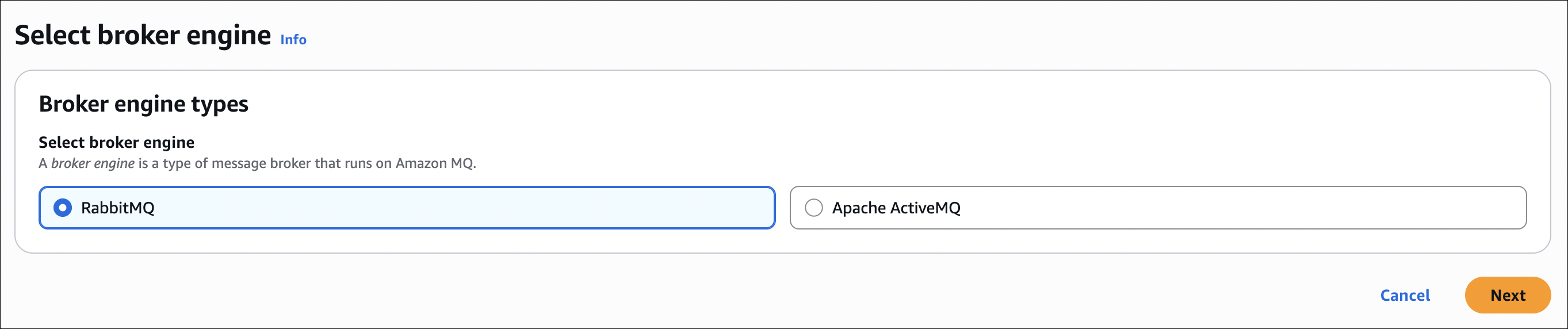
Amazon MQ provides managed message brokers (ActiveMQ or RabbitMQ). Your applications connect using standard protocols (JMS, AMQP, etc.). Amazon MQ handles infrastructure, scaling, high availability.
Key concepts:
- Message broker: Manages messages between applications
- Protocols: Supports JMS, AMQP, MQTT, STOMP, WebSocket
- Engines: ActiveMQ or RabbitMQ
- High availability: Multi-AZ deployment option
Use Cases
- Migrate existing apps: Lift and shift applications using traditional message brokers
- Enterprise messaging: Need standard protocols (JMS, AMQP) for enterprise integration
- Hybrid cloud: Connect on-premises apps with AWS using standard protocols